Faster triage
Walk every layer in one pass instead of bouncing between five consoles.
SELF-HOSTED NETWORK DIAGNOSTICS SOFTWARE
PathWise is network diagnostics software you download and run yourself. It reasons across the full access path, device to destination, and hands back an evidence-backed answer you can paste straight into the ticket. Vendor-neutral. It finds the problem and never makes the change itself.
In plain terms: it tells your team which layer of the network broke, and shows the evidence, without ever changing a thing.
Download it, run it on your own box. An annual subscription, and it verifies offline.
PathWise access-path trace for the ticket "user cannot reach payroll-app." The device, local network, and user layers are healthy: the IP is 10.4.12.88/22, the gateway is reachable, the VPN tunnel is up, and the single sign-on assertion is valid with MFA satisfied. The rights layer is blocked: the Check Point rule "permit-payroll" never matched, because Identity Awareness has no IP-to-user mapping for 10.4.12.88. The resolution, routing, session, and destination layers were skipped, since the entry point was set by the error class. Finding: the user is not mapped to their IP, so the identity-based permit rule never matches. Evidence: the Check Point logs show a drop on the cleanup rule, and Identity Awareness shows no mapping for 10.4.12.88, both high confidence. Not verified: whether the user authenticated to the identity collector today. Proposed solution for a person to perform: re-run Identity Awareness mapping for the user, or have them re-authenticate to the collector. PathWise does not make the change. It hands the fix to a person to run.
There is a name for the thing that eats your day. Mean time to innocence: the time it takes each team to prove the fault is somewhere else. Every team is right, every team is looking at its own layer, and nobody is looking at the whole path.
Walk every layer in one pass instead of bouncing between five consoles.
Every claim cites its source, with a confidence and an honest note on what was not verified.
Enforced in code, not model judgment. It cannot change anything, even if you tell it to.
Self-hosted in your own environment. Your chosen model provider does the reasoning.
Captures each diagnosis as knowledge on your box and reuses it. A repeat problem is confirmed with one probe instead of a full sweep.
A ranked report shows the problems that keep coming back, so you fix them at the source and the tickets stop.
THE ACTUAL SCREEN
PathWise runs in your browser, on your own box. The access path draws itself as the engine works, each layer filling with the evidence behind it.
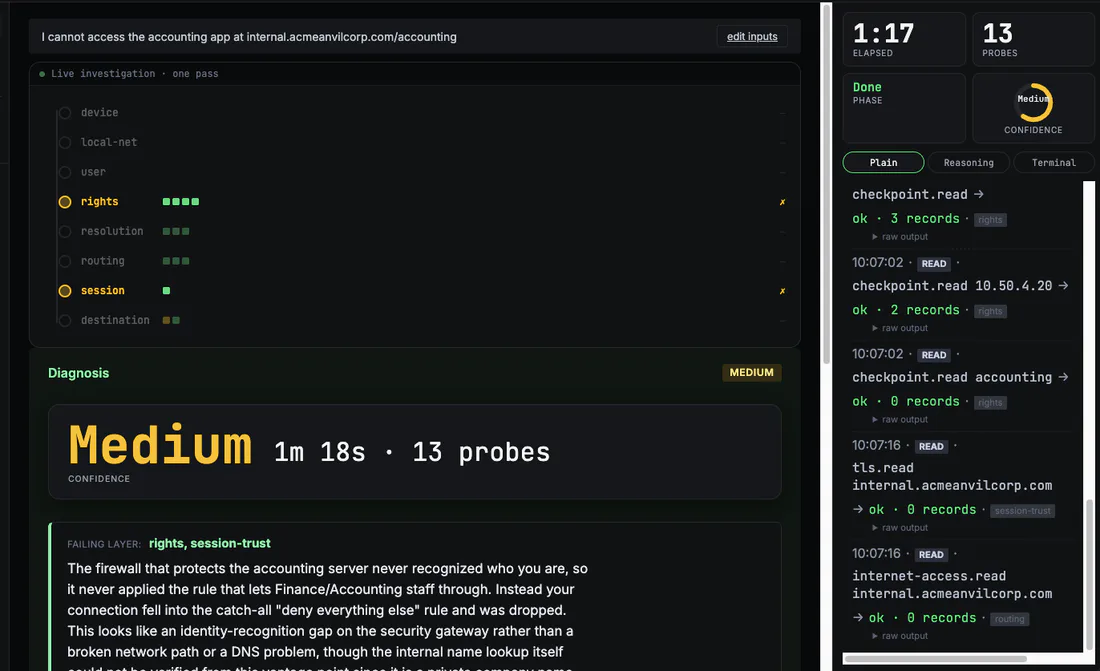
Anyone with the right permissions stands PathWise up in your environment. From then on, anyone working an access ticket gets the same evidence-backed answer, with no new tool to learn.
Stand it up once, encode your team's know-how as modules, and stop making one person the single point of triage for every access ticket.
Triage an access ticket in one pass and escalate with the evidence already attached, not a hunch.
Debug DNS, TLS, auth, and can't-reach-the-service without leaving the terminal or filing a network ticket.
You do not have to trust the reasoning. You can check it. PathWise runs read-only, shows every probe and every piece of evidence it used, and stops at a recommendation you approve. Run it against a problem you already know the answer to and judge it yourself. See a real run ›
The no-change guarantee lives in the code, not the model. A prompt-injected or weak model still cannot make a change, escape the guardrail, or run a fix.
Each claim carries its grounding, a confidence, and what was not verified. No bare assertions, no invented data.
PathWise stops at a proposed solution for you to read and perform. It never acts on its own.
The layers are universal. Your vendors plug in as modules that read a layer. They are never the layer.
The Open Module Standard is free and public. Write a module for any tool you run, at no cost and without asking us. The modules we maintain ship inside the engine you buy.
From $399 a year. Yours to run on your own machines. A usage license, no resale, as-is. Self-hosted, and it verifies offline.
It runs on your own machines with no license server to call, and it keeps working offline.
Anyone with the right permissions stands it up. After that, anyone working an access ticket, help desk, IT ops, or developers, gets the same evidence-backed answer.
The engine skeleton as a Docker image, all nine modules, the command-line tool, and the browser interface. You supply your own model backend.
No. It diagnoses and advises. It runs checks, including its own live network probes, and proposes a fix you perform. It makes no changes.
PathWise is built by an engineer with more than 30 years in systems infrastructure, 18 of them securing networks in regulated banking, holding the CISSP and CCSP. It solves a problem its builder has lived for two decades. You still do not have to take it on faith. PathWise cannot change your systems. The read-only boundary lives in the code, not in a request to the model, so the worst case is a wrong answer you catch, never a wrong action. Every answer shows the probes it ran and the evidence behind each claim, so you check the conclusion instead of trusting it. It ships with more than 1,600 automated tests, and an outside security review of the live app in July 2026 found no critical or high issues. And it is free to trial on your own box until the beta license expires in one year. Point it at a problem you already understand and watch what it does before you pay.
You bring your own. It runs against the Anthropic API by default, or any OpenAI-compatible backend, including a local model through Ollama or vLLM. A managed in-tenant placement is planned. The model is a quality dial you set.
Your model does the reasoning, so in the Anthropic mode your investigation data goes to your AI provider over your own key. Run a local model to keep the reasoning inside your boundary. A managed in-tenant cloud placement is planned. Probes send only the host or IP being checked.
A small folder of plain files describing one vendor or one layer. The standard is free and open, and you can write your own.
An annual subscription license. Solo covers one engineer. Team is licensed to one organization and covers four user accounts, with more sold in 3-packs. Modify it for internal use, no resale, as-is, copyright retained.